Text message program
Last updated 24 August 2026
Who sends them
These messages are sent by Hallows Group LLC, 5900 Balcones Drive #31966, Austin, TX 78731, United States, which operates RelayVault. That is the business registered with our messaging provider as the sender, and this website is its registered website. Questions about the program go to support@relayvault.app.
What the messages are
RelayVault monitors whether you check in on a schedule you set. The text messages it sends are transactional alerts about that schedule. There is no marketing, and the number is never used to promote anything.
Agreeing is optional
Text messages and phone calls are optional and are never required. RelayVault runs on email: you can decline them, or stop them later, and still create an account, use every feature, and be listed as an emergency contact.
Nothing in RelayVault is gated on agreeing to text messages. Creating an account does not ask for a mobile number, and the checkbox that switches texts on is unticked by default and can be unticked again at any time. Being named as somebody’s emergency contact does not require it either: escalation alerts and the messages themselves are delivered by email, and a contact reachable by email alone is alerted and can act exactly as any other. Text messages and calls are an additional way of reaching somebody quickly — never a condition of anything.
Both consent screens carry a button that records a refusal, so declining is a real outcome rather than an abandoned form: a number that has declined is not texted or called, and it stays that way even if somebody lists it again later.
Who receives them, and how they agreed
There are two kinds of recipient, and they agree in two different ways.
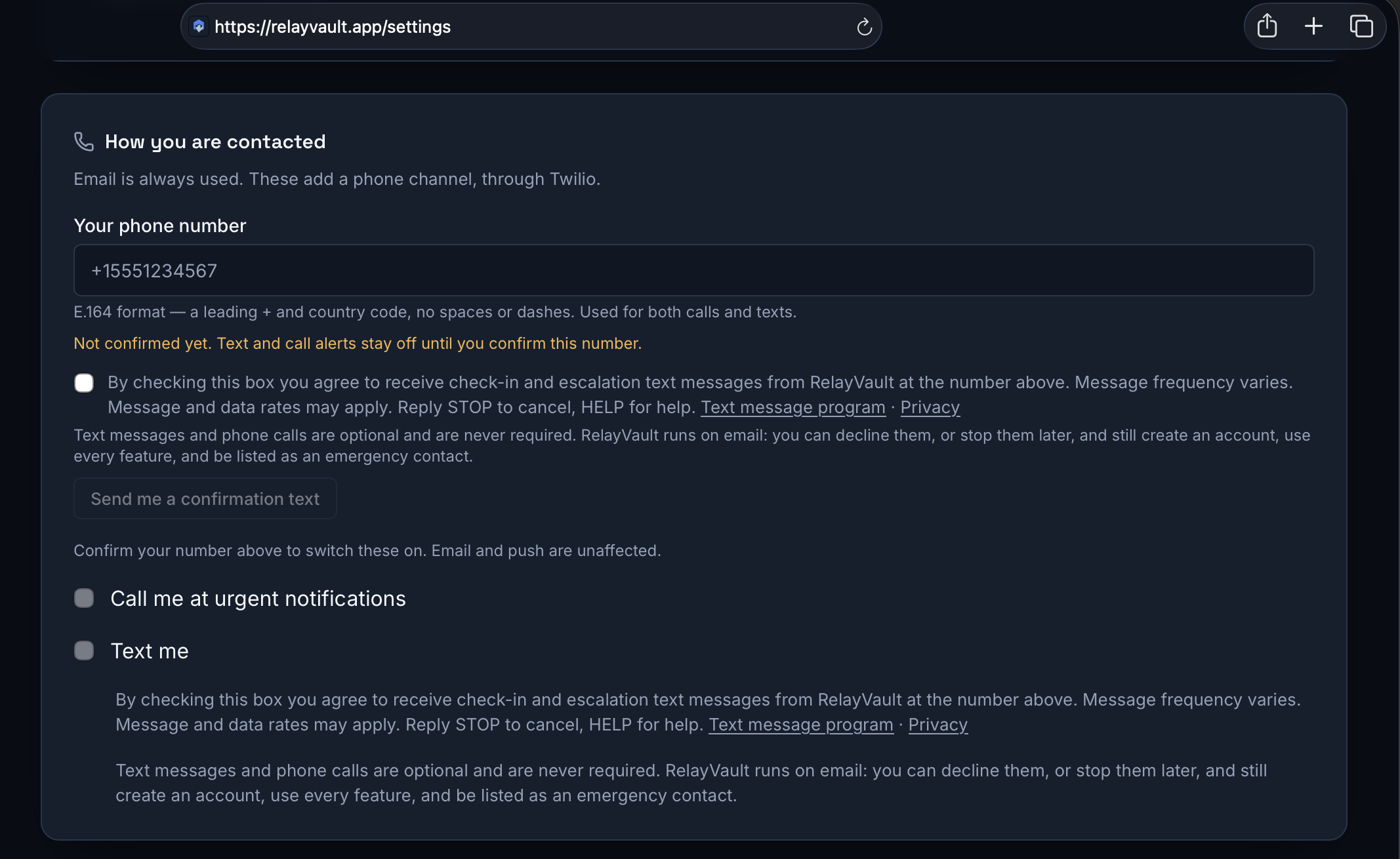
- Account holders. Signing up asks for no phone number at all. If you want texts, you enter your own mobile number in Settings under Escalation and tick a checkbox, unticked by default, carrying this wording in full: “By checking this box you agree to receive check-in and escalation text messages from RelayVault at the number above. Message frequency varies. Message and data rates may apply. Reply STOP to cancel, HELP for help.” Only then does RelayVault send anything — one confirmation text, whose link proves the number is yours. After that the Text me switch controls the alerts, and unticking it in the same place stops them. Leaving all of it alone costs you nothing: the schedule, escalation and delivery run on email regardless.
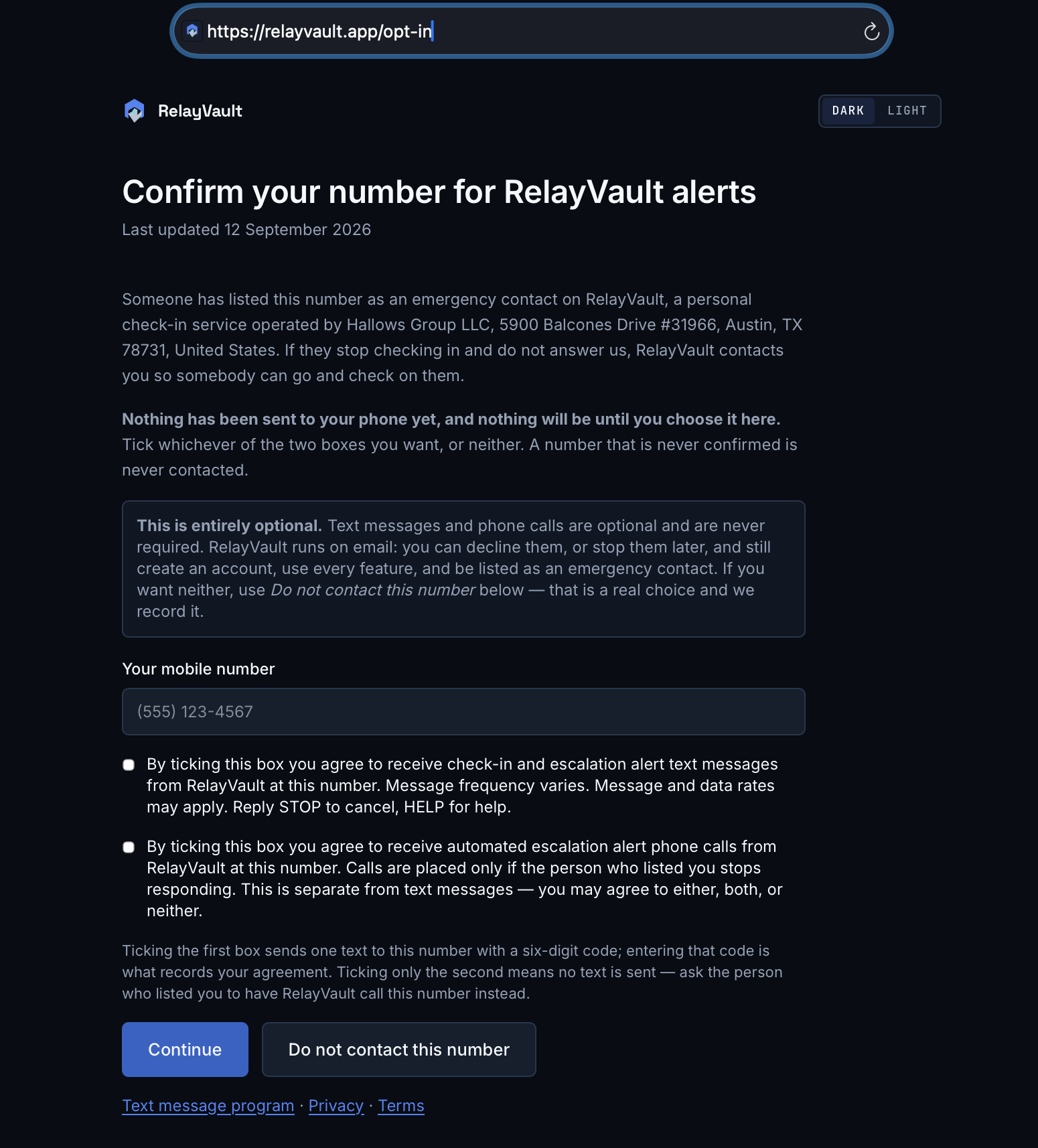
- Trusted contacts. An account holder names them, but naming alone sends nothing and never causes an alert. RelayVault does not text a number in order to ask it for consent. A nominated number becomes reachable in one of two ways, and both begin with the person holding the handset. They can go to relayvault.app/opt-in themselves — a public form, no account and no link required — enter their own mobile number and tick whichever they want of two boxes, both unticked by default and neither required. Texts: “By ticking this box you agree to receive check-in and escalation alert text messages from RelayVault at this number. Message frequency varies. Message and data rates may apply. Reply STOP to cancel, HELP for help.” Calls: “By ticking this box you agree to receive automated escalation alert phone calls from RelayVault at this number. Calls are placed only if the person who listed you stops responding. This is separate from text messages — you may agree to either, both, or neither.” Ticking the first sends a six-digit code to that handset, and entering the code is what records the agreement. Submitting with neither ticked sends nothing and is answered with a page saying so; a second button, Do not contact this number, records a refusal outright. Alternatively the account holder can pass them a private confirmation link, which opens the same wording with the same tick and the same refusal button and expires after seven days. A number given for calls instead receives an automated call that names RelayVault, says who listed them, and asks them to press 1. Only a confirmed number is ever contacted; a number that is never confirmed is never texted at all, and a number that has declined is not contacted even if somebody lists it again.
What the opt-in looks like
This is the account holder’s control, in Settings under Escalation. The box is unticked until you tick it, the wording below it is the sentence quoted above, and the button that sends the confirmation text stays disabled until it is ticked.
A trusted contact sees a different screen, because they have no account — and it is public, so you can open it right now: relayvault.app/opt-in. It names the program and its operator, states plainly that agreeing is optional, and asks for a mobile number beside two separate checkboxes — one for texts, one for calls — both unticked and neither required. There are two buttons: Continue, and Do not contact this number. Continuing with nothing ticked sends no message and returns a page that says so. Ticking the text box sends a six-digit code to that handset, and entering it is what records the consent. The same page also opens from a private confirmation link an account holder can hand over, which additionally names who listed them and expires after seven days. Nothing is recorded on either path until the person acts, and this page links our Privacy and Terms pages beside the consent wording so they can be read at that moment.
What they say
Account holders receive check-in reminders and escalation warnings, such as:
- RelayVault: Jacob, you haven’t checked in. Confirm you’re OK: relayvault.app/check-ins Reply STOP to opt out.
Verified trusted contacts are only messaged if an account holder has stopped responding entirely:
- RelayVault: Jacob hasn’t checked in and listed you as a trusted contact. Please verify: relayvault.app/intervention Reply STOP to opt out.
How often
Message frequency varies and depends entirely on your own schedule and whether you check in. Someone who checks in on time receives no texts at all. A missed check-in produces a small number of alerts spread across the escalation timings you configured.
Cost
Message and data rates may apply. RelayVault does not charge for text messages; your mobile carrier may.
Stopping messages
Reply STOP to any message to stop all texts to that number. Reply START to resume. Reply HELP for help, or write to support@relayvault.app.
Account holders can also switch SMS off in Settings under Escalation, and a trusted contact can refuse outright with the Do not contact this number button on relayvault.app/opt-in. Stopping texts does not stop the service: check-in reminders, escalation and delivery continue by email, your schedule is unchanged, and a trusted contact who has declined texts is still alerted by email and can still act.
Your number
Mobile numbers are used only to deliver the alerts described here. We do not sell them, and we do not share them with third parties for marketing. They are passed only to the telecoms provider that carries the message. See our Privacy page for the rest.